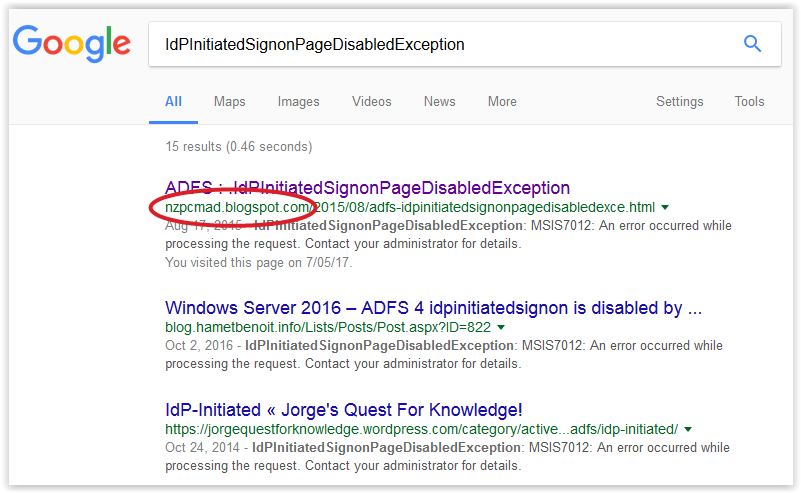
Now this I like :-)
Top search result - awesome.
Enjoy!
Ideas and thoughts about Microsoft Identity, C# development, cabbages and kings and random flotsam on the incoming tide
Friday, May 26, 2017
Thursday, May 25, 2017
ADFS : The case of the slanting quote
I don't know the official name of this character but it's the double quote sign that slants to the right.
There was a question on the forum about a claims rule that threw "POLICY0002: Could not parse policy data" when the user tried to save it.
It looked like:
c:[Type == "http://adatum.com/data1holder", Issuer == "AD AUTHORITY"]
=> issue(type = "http://adatum.com/data1", Value = RegExReplace(c.Value,”'”,””);
The problem was the slanting quotes in the RegExReplace.
Using the double quote key (") on the keyboard and replacing these gives:
c:[Type == "http://adatum.com/data1holder", Issuer == "AD AUTHORITY"]
=> issue(type = "http://adatum.com/data1", Value = RegExReplace(c.Value,"'","");
which parses no problem.
Enjoy!
There was a question on the forum about a claims rule that threw "POLICY0002: Could not parse policy data" when the user tried to save it.
It looked like:
c:[Type == "http://adatum.com/data1holder", Issuer == "AD AUTHORITY"]
=> issue(type = "http://adatum.com/data1", Value = RegExReplace(c.Value,”'”,””);
The problem was the slanting quotes in the RegExReplace.
Using the double quote key (") on the keyboard and replacing these gives:
c:[Type == "http://adatum.com/data1holder", Issuer == "AD AUTHORITY"]
=> issue(type = "http://adatum.com/data1", Value = RegExReplace(c.Value,"'","");
which parses no problem.
Enjoy!
Monday, May 15, 2017
ADFS : You can change anything in the Theme structure
The official document around onload.js and customising the ADFS login page for 2012 R2 and 2016 (ADFS 3.0 and 4.0) is here.
The Theme directory structure looks like:
Directory of C:\...\Theme\Custom
05/11/2017 09:26 PM .
05/11/2017 09:26 PM ..
05/11/2017 09:26 PM css
05/11/2017 09:26 PM illustration
05/11/2017 09:26 PM images
05/11/2017 09:26 PM script
0 File(s) 0 bytes
Directory of C:\...\Theme\Custom\css
05/11/2017 09:26 PM .
05/11/2017 09:26 PM ..
05/11/2017 09:26 PM 8,144 style.css
05/11/2017 09:26 PM 8,146 style.rtl.css
2 File(s) 16,290 bytes
Directory of C:\...\Theme\Custom\illustration
05/11/2017 09:26 PM .
05/11/2017 09:26 PM ..
05/11/2017 09:26 PM 116,699 illustration.png
1 File(s) 116,699 bytes
Directory of C:\...\Theme\Custom\images
05/11/2017 09:26 PM .
05/11/2017 09:26 PM ..
05/14/2017 08:45 PM idp
0 File(s) 0 bytes
Directory of C:\...\Theme\Custom\images\idp
05/14/2017 08:45 PM .
05/14/2017 08:45 PM ..
05/11/2017 09:26 PM 931 idp.png
05/11/2017 09:32 PM 1,727 localsts.png
05/11/2017 09:26 PM 1,977 otherorganizations.png
3 File(s) 4,635 bytes
Directory of C:\...\Theme\Custom\script
05/11/2017 09:26 PM .
05/11/2017 09:26 PM ..
05/11/2017 10:23 PM 5,925 onload.js
1 File(s) 5,925 bytes
The document refers to onload.js but you can use the same commands for any of the above files.
@Pierre e.g. has blogged on changing the "thumbnails" here.
The command for this then looks like:
Set-AdfsWebTheme -TargetName MyTheme -AdditionalFileResource @{Uri="/adfs/portal/images/idp/idp.png";path="C:\MyTheme\images\idp\idp-adfs.png"}
Enjoy!
The Theme directory structure looks like:
Directory of C:\...\Theme\Custom
05/11/2017 09:26 PM .
05/11/2017 09:26 PM ..
05/11/2017 09:26 PM css
05/11/2017 09:26 PM illustration
05/11/2017 09:26 PM images
05/11/2017 09:26 PM script
0 File(s) 0 bytes
Directory of C:\...\Theme\Custom\css
05/11/2017 09:26 PM .
05/11/2017 09:26 PM ..
05/11/2017 09:26 PM 8,144 style.css
05/11/2017 09:26 PM 8,146 style.rtl.css
2 File(s) 16,290 bytes
Directory of C:\...\Theme\Custom\illustration
05/11/2017 09:26 PM .
05/11/2017 09:26 PM ..
05/11/2017 09:26 PM 116,699 illustration.png
1 File(s) 116,699 bytes
Directory of C:\...\Theme\Custom\images
05/11/2017 09:26 PM .
05/11/2017 09:26 PM ..
05/14/2017 08:45 PM idp
0 File(s) 0 bytes
Directory of C:\...\Theme\Custom\images\idp
05/14/2017 08:45 PM .
05/14/2017 08:45 PM ..
05/11/2017 09:26 PM 931 idp.png
05/11/2017 09:32 PM 1,727 localsts.png
05/11/2017 09:26 PM 1,977 otherorganizations.png
3 File(s) 4,635 bytes
Directory of C:\...\Theme\Custom\script
05/11/2017 09:26 PM .
05/11/2017 09:26 PM ..
05/11/2017 10:23 PM 5,925 onload.js
1 File(s) 5,925 bytes
The document refers to onload.js but you can use the same commands for any of the above files.
@Pierre e.g. has blogged on changing the "thumbnails" here.
The command for this then looks like:
Set-AdfsWebTheme -TargetName MyTheme -AdditionalFileResource @{Uri="/adfs/portal/images/idp/idp.png";path="C:\MyTheme\images\idp\idp-adfs.png"}
Enjoy!
Friday, May 12, 2017
ADFS : Avoiding the Home Realm Discovery screen by using a link
I was asked if given the HRD screen is just "buttons" and there was a "link" behind that and users always picked the same one. could they not simply add the "link" to their web site and avoid the HRD screen altogether?
The basic problem with this is that the link is not static – it’s actually dynamic.
Take SAML-P as a example.
Assume the HRD screen has two entries; ADFS A and ADFS B.
The SAML request from the application to ADFS A gives:
https://adfs-a/adfs/ls/?SAMLRequest=…
And then selecting ADFS B via HRD gives:
https://adfs-b/adfs/ls/?SAMLRequest=...
The SAML request itself is different because as the packet goes through each ADFS, it’s signed with that ADFS’s signing key.
So the "link" would have to be updated every time a signing certificate changed.
In addition, a section of the SAML AuthnRequest contains:
IssueInstant="2017-05-11T01:27:25.56Z"
The request contains the time the request was sent – which is dynamic.
There is an ADFS parameter for SAML called “clock skew”.
ADFS rejects the request when the skew between the server clock and the time in the request is more than 30 seconds (by default).
So nice try but no cigar!
Enjoy!
The basic problem with this is that the link is not static – it’s actually dynamic.
Take SAML-P as a example.
Assume the HRD screen has two entries; ADFS A and ADFS B.
The SAML request from the application to ADFS A gives:
https://adfs-a/adfs/ls/?SAMLRequest=…
And then selecting ADFS B via HRD gives:
https://adfs-b/adfs/ls/?SAMLRequest=...
The SAML request itself is different because as the packet goes through each ADFS, it’s signed with that ADFS’s signing key.
So the "link" would have to be updated every time a signing certificate changed.
In addition, a section of the SAML AuthnRequest contains:
IssueInstant="2017-05-11T01:27:25.56Z"
The request contains the time the request was sent – which is dynamic.
There is an ADFS parameter for SAML called “clock skew”.
ADFS rejects the request when the skew between the server clock and the time in the request is more than 30 seconds (by default).
So nice try but no cigar!
Enjoy!
ADFS : Augmenting the default JWT with additional attributes
This is for Server 2016 - ADFS 4.0.
The standard use case is for an ASP.NET application using OpenID Connect / OAuth via the NuGet OWIN packages taking to ADFS.
The standard way is to configure a server application as above.
This all works . The problem is that the ADFS wizard does not have any way to configure claims rules. As a result you get the standard set of claims in the JWT.
aud 8173...1501
iss https://xxx.cloudapp.net/adfs
iat 1494378378
exp 1494381978
http://schemas.microsoft.com/ws/2008/06/identity/claims/authenticationinstant 1494378377
nonce 6362....NmVl
http://schemas.xmlsoap.org/ws/2005/05/identity/claims/nameidentifier 0JrA...H7k=
http://schemas.xmlsoap.org/ws/2005/05/identity/claims/upn user1@dev.local
http://schemas.xmlsoap.org/ws/2005/05/identity/claims/name DEV\user1
c_hash baOc...R8GA
The only user specific details are the "upn" and the "name".
But what if you want more?
You can use the "Web browser accessing a web application" profile as per this.
This profile achieves the result in a roundabout way:
"Behind the scenes, this template creates a native client and new app type called Web application, which is just a Web API with an Identifier (RPID) that matches the native client's client ID. This means the Web application is simultaneously client and resource, so you can assign issuance transform rules as you would with a Web API."
I configured some claims in the wizard:
Now when I authenticate, I get this:
aud c906...3ab4
iss https://xxx.cloudapp.net/adfs
iat 1494379409
exp 1494383009
http://schemas.microsoft.com/ws/2008/06/identity/claims/authenticationinstant 1494379408
nonce 6362...NTk2
http://schemas.xmlsoap.org/ws/2005/05/identity/claims/nameidentifier PRUA...50U=
http://schemas.xmlsoap.org/ws/2005/05/identity/claims/name DEV\user1
http://schemas.xmlsoap.org/ws/2005/05/identity/claims/upn user1@dev.local
http://schemas.xmlsoap.org/ws/2005/05/identity/claims/givenname User1
http://schemas.xmlsoap.org/ws/2005/05/identity/claims/surname Test
http://schemas.xmlsoap.org/ws/2005/05/identity/claims/emailaddress user1@company.com
http://schemas.xmlsoap.org/claims/CommonName User1 Test
apptype Public
appid c906...3ab4
http://schemas.microsoft.com/ws/2008/06/identity/claims/authenticationmethod urn:oasis:names:tc:SAML:2.0:ac:classes:PasswordProtectedTransport
ver 1.0
http://schemas.microsoft.com/identity/claims/scope openid
c_hash -0ZX...Z81A
You will also notice that the apptype is "Public" i.e. a web site as opposed to "confidential" i.e. a web API.
I also answered a question in stackoverflow along these lines here.
As per the discussion from @Efrain:
"As indicated in @nzpcmad's answer, it appears that custom claims in the id_token using the default URL-parameter-encoded GET redirect is simply not supported. The reason for this may be that there is an URL length limit, but I find that quite questionable.
Enjoy!
The standard use case is for an ASP.NET application using OpenID Connect / OAuth via the NuGet OWIN packages taking to ADFS.
The standard way is to configure a server application as above.
This all works . The problem is that the ADFS wizard does not have any way to configure claims rules. As a result you get the standard set of claims in the JWT.
aud 8173...1501
iss https://xxx.cloudapp.net/adfs
iat 1494378378
exp 1494381978
http://schemas.microsoft.com/ws/2008/06/identity/claims/authenticationinstant 1494378377
nonce 6362....NmVl
http://schemas.xmlsoap.org/ws/2005/05/identity/claims/nameidentifier 0JrA...H7k=
http://schemas.xmlsoap.org/ws/2005/05/identity/claims/upn user1@dev.local
http://schemas.xmlsoap.org/ws/2005/05/identity/claims/name DEV\user1
c_hash baOc...R8GA
The only user specific details are the "upn" and the "name".
But what if you want more?
You can use the "Web browser accessing a web application" profile as per this.
This profile achieves the result in a roundabout way:
"Behind the scenes, this template creates a native client and new app type called Web application, which is just a Web API with an Identifier (RPID) that matches the native client's client ID. This means the Web application is simultaneously client and resource, so you can assign issuance transform rules as you would with a Web API."
I configured some claims in the wizard:
Now when I authenticate, I get this:
aud c906...3ab4
iss https://xxx.cloudapp.net/adfs
iat 1494379409
exp 1494383009
http://schemas.microsoft.com/ws/2008/06/identity/claims/authenticationinstant 1494379408
nonce 6362...NTk2
http://schemas.xmlsoap.org/ws/2005/05/identity/claims/nameidentifier PRUA...50U=
http://schemas.xmlsoap.org/ws/2005/05/identity/claims/name DEV\user1
http://schemas.xmlsoap.org/ws/2005/05/identity/claims/upn user1@dev.local
http://schemas.xmlsoap.org/ws/2005/05/identity/claims/givenname User1
http://schemas.xmlsoap.org/ws/2005/05/identity/claims/surname Test
http://schemas.xmlsoap.org/ws/2005/05/identity/claims/emailaddress user1@company.com
http://schemas.xmlsoap.org/claims/CommonName User1 Test
apptype Public
appid c906...3ab4
http://schemas.microsoft.com/ws/2008/06/identity/claims/authenticationmethod urn:oasis:names:tc:SAML:2.0:ac:classes:PasswordProtectedTransport
ver 1.0
http://schemas.microsoft.com/identity/claims/scope openid
c_hash -0ZX...Z81A
You will also notice that the apptype is "Public" i.e. a web site as opposed to "confidential" i.e. a web API.
I also answered a question in stackoverflow along these lines here.
As per the discussion from @Efrain:
"As indicated in @nzpcmad's answer, it appears that custom claims in the id_token using the default URL-parameter-encoded GET redirect is simply not supported. The reason for this may be that there is an URL length limit, but I find that quite questionable.
Anyway, apparently this restriction does not apply when the token is
returned in a POST redirect. That's also why people describe it working
just fine for MVC applications.
So I was able to work around the problem by redirecting the response to a back-end API endpoint (POST), which just redirects it to the front-end (SPA) again, but as a GET request with URL-encoded parameters:
public class LoginController : ApiController
{
[HttpPost]
[Route("login")]
public HttpResponseMessage Login(FormDataCollection formData)
{
var token = formData["id_token"];
var state = formData["state"];
var response = Request.CreateResponse(HttpStatusCode.Moved);
var frontendUri = ConfigurationManager.AppSettings["ad:FrontendUri"];
response.Headers.Location = new Uri($"{frontendUri}#id_token={token}
&state={state}");
return response;
}
}
Note that to change the response method from GET to POST, one simply has to add &response_mode=form_post to the OAuth request URL."Enjoy!
Monday, May 08, 2017
ADFS : Passing NameID across CP and RP
Imagine the following:
CP A --> federated with CP B --> RP
So a user goes to the RP and via HRD on CP B selects CP A and authenticates against AD.
The claims derived from CP A need to be passed across.
On CP A we have the standard LDAP rules since the user authenticated against that AD.
One of the claims we want to pass across is NameID.
You have to configure pass-through rules on CP B and the RP.
So the claims are configured in three places.
The problem is that NameID never makes it across.
There are a number of posts from people reporting the same thing but no solution.
The way I got around it was:
Assume that we want sAMAccountName to be NameID.
On CP A, have a LDAP rule:
sAMAccountName --> http://company/claims/sAMAccountName
Plus pass-through all the other claims.
On CP B, have a Transform rule:
http://company/claims/sAMAccountName --> NameID
Plus pass-through all the other claims.
In the RP, pass-through all the claims including NameID.
Now imagine you have two RP, RP A and RP B.
RP A wants sAMAccountName to be NameID.
RP B wants UPN to be NameID.
Now we have a problem because they both share the same pipeline CP A and CP B. You can't have two different rules both passing NameID.
What you have to do on CP A is:
UPN --> http://company/claims/UPN
Here you pass both http://company/claims/sAMAccountName and http://company/claims/UPN through on CP B and then transform them at the RP level to the NameID; one for each.
Enjoy!
CP A --> federated with CP B --> RP
So a user goes to the RP and via HRD on CP B selects CP A and authenticates against AD.
The claims derived from CP A need to be passed across.
On CP A we have the standard LDAP rules since the user authenticated against that AD.
One of the claims we want to pass across is NameID.
You have to configure pass-through rules on CP B and the RP.
So the claims are configured in three places.
The problem is that NameID never makes it across.
There are a number of posts from people reporting the same thing but no solution.
The way I got around it was:
Assume that we want sAMAccountName to be NameID.
On CP A, have a LDAP rule:
sAMAccountName --> http://company/claims/sAMAccountName
Plus pass-through all the other claims.
On CP B, have a Transform rule:
http://company/claims/sAMAccountName --> NameID
Plus pass-through all the other claims.
In the RP, pass-through all the claims including NameID.
Now imagine you have two RP, RP A and RP B.
RP A wants sAMAccountName to be NameID.
RP B wants UPN to be NameID.
Now we have a problem because they both share the same pipeline CP A and CP B. You can't have two different rules both passing NameID.
What you have to do on CP A is:
UPN --> http://company/claims/UPN
Here you pass both http://company/claims/sAMAccountName and http://company/claims/UPN through on CP B and then transform them at the RP level to the NameID; one for each.
Enjoy!
Wednesday, April 12, 2017
Visual Studio : ReplacableToken_ApplicationServices on transform
Using VS 2015 and doing a transform on my web.config.
My connection string is something like:
connectionString="data source=.\SQLEXPRESS;Integrated Security ..."
but what appears in the transformed file is:
connectionString="$(ReplacableToken_ApplicationServices-Web.config Connection String_0) ..."
WTF?
Much conversation with Mr. Google and eventually the solution is:
You need to add this to the appropriate .pubxml file under Properties\PublishProfiles
Enjoy!
My connection string is something like:
connectionString="data source=.\SQLEXPRESS;Integrated Security ..."
but what appears in the transformed file is:
connectionString="$(ReplacableToken_ApplicationServices-Web.config Connection String_0) ..."
WTF?
Much conversation with Mr. Google and eventually the solution is:
<AutoParameterizationWebConfigConnectionStrings>False</AutoParameterizationWebConfigConnectionStrings>
You need to add this to the appropriate .pubxml file under Properties\PublishProfiles
Enjoy!
Thursday, April 06, 2017
C# : Sending email
I needed a quick and dirty C# module to test a SMTP server.
So I came up with this.
I used Windows Forms and a very simple button.
This uses the System.Net.Mail.MailMessage class.
Enjoy!
So I came up with this.
I used Windows Forms and a very simple button.
This uses the System.Net.Mail.MailMessage class.
Enjoy!
ASP.NET : Comparing a VS project to a web site
We have a legacy project which has been untouched and unloved for many years.
Then we needed to make an urgent change.
The problem was that the people who had worked on the project were long gone and nobody knew if the source in the repository was up to date?
So we took a copy of the web site,
You can't just compare this to the VS project. In VS, you have an aspx file and a corresponding cs file. In the web site, the aspx files are there but the cs files are all rolled up into a dll.
You can't directly compare dll either. There's guids, dates etc. that keep changing every time you do a build.
The way to do this is to deploy your current project to IIS and then compare the two web sites.
You still have the problem of comparing the dll files in the \bin directory.
To do this, decompile the dll into a VS project using something like Reflector or dotPeek and then compare the source code.
Some of the names will be different e.g. "isComplete" vs. "flag1" but it will give you a pretty good idea of whether there have been code changes,
Enjoy!
Then we needed to make an urgent change.
The problem was that the people who had worked on the project were long gone and nobody knew if the source in the repository was up to date?
So we took a copy of the web site,
You can't just compare this to the VS project. In VS, you have an aspx file and a corresponding cs file. In the web site, the aspx files are there but the cs files are all rolled up into a dll.
You can't directly compare dll either. There's guids, dates etc. that keep changing every time you do a build.
The way to do this is to deploy your current project to IIS and then compare the two web sites.
You still have the problem of comparing the dll files in the \bin directory.
To do this, decompile the dll into a VS project using something like Reflector or dotPeek and then compare the source code.
Some of the names will be different e.g. "isComplete" vs. "flag1" but it will give you a pretty good idea of whether there have been code changes,
Enjoy!
Thursday, March 30, 2017
WCF : Calling an async. method
Just for a change, I was asked to help out on a non-Identity project.
There was a legacy host that only understood SOAP and a modern back-end that only supported REST web API.
So we need a bridge between them and I had to remember everything I had ever forgotten about WCF.
I needed my WCF method to call:
string response = await my_api.CallREST(parameter);
The problem is that the compiler expects the method to be decorated with async.
Aync. WCF?
Turns out you can.
My method looks like:
public async Task<validateresponse> ValidateParameter (parameter)
... and similarly for the interface.
And it works!
The word "async" doesn't appear anywhere is the WSDL. It appears to be completely ignored.
Enjoy!
There was a legacy host that only understood SOAP and a modern back-end that only supported REST web API.
So we need a bridge between them and I had to remember everything I had ever forgotten about WCF.
I needed my WCF method to call:
string response = await my_api.CallREST(parameter);
The problem is that the compiler expects the method to be decorated with async.
Aync. WCF?
Turns out you can.
My method looks like:
public async Task<validateresponse> ValidateParameter (parameter)
... and similarly for the interface.
And it works!
The word "async" doesn't appear anywhere is the WSDL. It appears to be completely ignored.
Enjoy!
Friday, March 24, 2017
ADFS : Copy claims rules over
Don't know how many times I've done this.
Deploy to Dev., get everything working, deploy to QAS, support QAS acceptance testing, deploy to Prod., smoke test.
When you have a lot of claims rules to copy over, I found a neat way to do it.
e.g. for a CP.
(Get-AdfsClaimsProviderTrust -Name "My CP").AcceptanceTransformRules | Out-File “C:\path\CPClaimsRules.txt”
And then import the rules to the new CP.
Set-AdfsClaimsProviderTrust -TargetName "My CP" -AcceptanceTransformRulesFile “C:\path\CPClaimsRules.txt” .
I've found that this also avoids the issue where you keep a copy of the rules in e.g. Word and then when you try and paste them into the ADFS wizard, you get all kinds of format errors.
Update: But beware copying groups over.
Enjoy!
Deploy to Dev., get everything working, deploy to QAS, support QAS acceptance testing, deploy to Prod., smoke test.
When you have a lot of claims rules to copy over, I found a neat way to do it.
e.g. for a CP.
(Get-AdfsClaimsProviderTrust -Name "My CP").AcceptanceTransformRules | Out-File “C:\path\CPClaimsRules.txt”
And then import the rules to the new CP.
Set-AdfsClaimsProviderTrust -TargetName "My CP" -AcceptanceTransformRulesFile “C:\path\CPClaimsRules.txt” .
I've found that this also avoids the issue where you keep a copy of the rules in e.g. Word and then when you try and paste them into the ADFS wizard, you get all kinds of format errors.
Update: But beware copying groups over.
Enjoy!
Wednesday, March 22, 2017
ADFS : Creating a custom attribute store
This is for ADFS 4.0 on Server 2016.
This is a good write-up.
Unfortunately, all the code is in a screen shot which sucks. Somewhat difficult to copy / paste :-).
Luckily, similar code can be found here.
Just standardise the names; one is "ToUpper"; the other is "toUpper".
However, my requirement was for getting claims from a back-end (details unimportant for the purposes of this post) where a user could have many claims of that type returned. Think of a property ID where one person owns a house but an investor owns several.
All the examples were for returning one attribute.
Essentially, you are returning a C# jagged array e.g. string[][] resultData.
My query string was :
c:[Type == "http://schemas.xmlsoap.org/ws/2005/05/identity/claims/emailaddress"]
=> issue(store = "CAS", types = ("HouseID"), query = "House", param = c.Value);
So I assumed that the multiple claims would be in the same row i.e. one row; many columns.
The search to the back-end returned 3 houses.
I then got:
Microsoft.IdentityServer.ClaimsPolicy.Language.PolicyEvaluationException: POLICY0019: Query 'House' to attribute store 'CAS' returned an unexpected number of fields: expected '1', got '3'.
If you look at the query, you'll see there is only one query parameter which will only return one result. A query which returns 3 results would be like:
query = "House", sn, mail
So what I need is 3 rows; one column.
I found some guidance around this here.
One of the things that stumped me for a while was the fact that the array had to be dynamic because there could be any number of houses. That's why you add to a list and then cast to an array.
Another gotcha was the fact that while you can have a static rule like:
=> issue(type = "HouseID", value = "123456");
you cannot have that in a query string for the attribute store. You get:
System.ArgumentException: ID4216: The ClaimType 'HouseID' must be of format 'namespace'/'name'.
So it needs to be:
c:[Type == "http://schemas.xmlsoap.org/ws/2005/05/identity/claims/emailaddress"]
=> issue(store = "CAS", types = ("http://claim/HouseID"), query = "House", param = c.Value);
i.e. HouseID becomes http://claim/HouseID.
Once you have compiled a new .dll file, you have to copy it over in the ADFS directory on the server.
You will get "Access Denied" because ADFS is running. So you have to stop the ADFS service, copy over the .dll and then start up the service again.
You do not have to delete the custom attribute store in the wizard and reload it. When ADFS starts. it will load the latest .dll.
The gist with the code is here.
But if you want a sneak preview, the important part is:
Enjoy!
This is a good write-up.
Unfortunately, all the code is in a screen shot which sucks. Somewhat difficult to copy / paste :-).
Luckily, similar code can be found here.
Just standardise the names; one is "ToUpper"; the other is "toUpper".
However, my requirement was for getting claims from a back-end (details unimportant for the purposes of this post) where a user could have many claims of that type returned. Think of a property ID where one person owns a house but an investor owns several.
All the examples were for returning one attribute.
Essentially, you are returning a C# jagged array e.g. string[][] resultData.
My query string was :
c:[Type == "http://schemas.xmlsoap.org/ws/2005/05/identity/claims/emailaddress"]
=> issue(store = "CAS", types = ("HouseID"), query = "House", param = c.Value);
So I assumed that the multiple claims would be in the same row i.e. one row; many columns.
The search to the back-end returned 3 houses.
I then got:
Microsoft.IdentityServer.ClaimsPolicy.Language.PolicyEvaluationException: POLICY0019: Query 'House' to attribute store 'CAS' returned an unexpected number of fields: expected '1', got '3'.
If you look at the query, you'll see there is only one query parameter which will only return one result. A query which returns 3 results would be like:
query = "House", sn, mail
So what I need is 3 rows; one column.
I found some guidance around this here.
One of the things that stumped me for a while was the fact that the array had to be dynamic because there could be any number of houses. That's why you add to a list and then cast to an array.
Another gotcha was the fact that while you can have a static rule like:
=> issue(type = "HouseID", value = "123456");
you cannot have that in a query string for the attribute store. You get:
System.ArgumentException: ID4216: The ClaimType 'HouseID' must be of format 'namespace'/'name'.
So it needs to be:
c:[Type == "http://schemas.xmlsoap.org/ws/2005/05/identity/claims/emailaddress"]
=> issue(store = "CAS", types = ("http://claim/HouseID"), query = "House", param = c.Value);
i.e. HouseID becomes http://claim/HouseID.
Once you have compiled a new .dll file, you have to copy it over in the ADFS directory on the server.
You will get "Access Denied" because ADFS is running. So you have to stop the ADFS service, copy over the .dll and then start up the service again.
You do not have to delete the custom attribute store in the wizard and reload it. When ADFS starts. it will load the latest .dll.
The gist with the code is here.
But if you want a sneak preview, the important part is:
try
{
// Dummy values to illustrate the principle.
List<string> claimValues = new List<string>();
claimValues.Add("123456");
claimValues.Add("654321");
claimValues.Add("456123");
List<string[]> claimData = new List<string[]>();
// Each claim value is added to its own string array
foreach (string claimVal in claimValues)
{
claimData.Add(new string[1] { claimVal });
}
// The claim value string arrays are added to the string [][] that is
// returned by the Custom Attribute Store EndExecuteQuery()
string[][] resultData = claimData.ToArray();
TypedAsyncResult<string[][]> asyncResult = new TypedAsyncResult<string[]
[]>(callback, state);
asyncResult.Complete(resultData, true);
return asyncResult;
}
catch (Exception ex)
{
String innerMess = "";
if (ex.InnerException != null)
innerMess = ex.InnerException.ToString();
throw new AttributeStoreQueryExecutionException("CAS exception : " +
ex.Message + " " + innerMess);
}
Enjoy!
Subscribe to:
Posts (Atom)