There's many suggestions for this.
Refer my question on stackoverflow.
However, the TechNet wiki recommends tohtml. Just paste in your code snippet, select the language, click the button, copy the resulting html and paste back into whatever.
I use the white style.
Neat!
Enjoy!
Showing posts with label Blogger. Show all posts
Showing posts with label Blogger. Show all posts
Thursday, October 20, 2011


Friday, October 22, 2010
Blogger : Image messes up text
Wrote a new post and then decided to add an image using Blogger's image tool.
I use the Left / Large image options.
The text that was supposed to be below the image now turned up at the right hand side of the image about half way down.
Tried br and /br and a few other things but no go.
Mr. Google to the rescue.
Between the image and the following text insert:
Now the text is below the image, just as it should be.
Enjoy!
I use the Left / Large image options.
The text that was supposed to be below the image now turned up at the right hand side of the image about half way down.
Tried br and /br and a few other things but no go.
Mr. Google to the rescue.
Between the image and the following text insert:
Now the text is below the image, just as it should be.
Enjoy!
IE : Fixing the "Do you want to view only the web page content" popup
The most annoying part of Internet Explorer (IE) 8 is the "Do you want to view only the webpage content that was delivered securely?" popup that forces you to continually click "No".
Maybe it's useful when doing Internet banking but I get it every time I open up Blogger. Why wouldn't I want to see the whole page?
The solution is simple:
Tools / Internet Options / Security / Custom level / Miscellaneous / Display mixed content
and change the option from "Prompt" to "Enable".
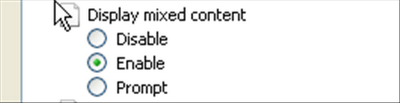
Reply "Yes" to the "Do you want to change this option?" question and OK out.
Problem solved.
Enjoy!
Maybe it's useful when doing Internet banking but I get it every time I open up Blogger. Why wouldn't I want to see the whole page?
The solution is simple:
Tools / Internet Options / Security / Custom level / Miscellaneous / Display mixed content
and change the option from "Prompt" to "Enable".

Reply "Yes" to the "Do you want to change this option?" question and OK out.
Problem solved.
Enjoy!
Tuesday, October 20, 2009
Blogger : Syntax highlighting for code
I hate the way Blogger displays code , XML etc, inside the "blockqoute" construct.
Then I came across this:
How to add syntax highlight to Blogger.
This uses Syntax Highlighter.
Just to add:
You don't need to host the files. You can use:
http://syntaxhighlighter.googlecode.com/svn/trunk/
e.g. the link in the article would become:
http://syntaxhighlighter.googlecode.com/svn/trunk/Styles/SyntaxHighlighter.css
Update: As per the comment:
More info. available here:
http://mlawire.blogspot.com/2009/07/blogger-syntax-highlighting.html
Warning: There are a number of posts around on how to do this - all slightly different - use at your own risk.
Enjoy!
Then I came across this:
How to add syntax highlight to Blogger.
This uses Syntax Highlighter.
Just to add:
You don't need to host the files. You can use:
http://syntaxhighlighter.googlecode.com/svn/trunk/
e.g. the link in the article would become:
http://syntaxhighlighter.googlecode.com/svn/trunk/Styles/SyntaxHighlighter.css
Update: As per the comment:
More info. available here:
http://mlawire.blogspot.com/2009/07/blogger-syntax-highlighting.html
Warning: There are a number of posts around on how to do this - all slightly different - use at your own risk.
Enjoy!
Subscribe to:
Posts (Atom)